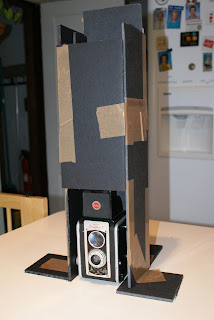
I thought I'd show my ttv tools. Ttv stands for through the viewfinder. I was able to purchase a Kodak Duaflex for just $5.00 from Lloyd's in Manitowoc. I've used it for all of the ttv shots I've made except the figure model in one of my previous posts. My taking camera is my Sony Alpha 200. I built a crude contraption to hold it at the right distance from the Duaflex. This gives me the ability to hold the camera still in low light situations and get a good exposure without the blur of a handheld shot. It also blocks light from hitting the viewfinder causing glare. It's been fun to play with.


The viewfinder image is flipped horizontally, so there is some editing to do on the computer. This photo show the lunch I had on March 26th 2012. I did some blurring of the background and cleaned up the foreground. As mentioned in the other ttv post, you get the dust and dirt from the old camera. When I blurred the background to separate the plant on the window sill from my sandwich, I softened the dust too. It didn't look right with the dirty foreground so I cleaned it up. The editing program used was Photoshop.


