Monday, January 27, 2014

Photo Processing Then and Now

In 1989 I moved from Milwaukee to Sheboygan Falls and began my professional photography career.  I got a job at Central Photo, now NZ's Bar, on Michigan Avenue in Sheboygan.  I had had a darkroom in my parent's basement that I'd been using since my high school days.  Now I was getting paid to do what had once been a hobby.  I've done mostly black and white film processing and printing while working there and at the Motophoto which became Light House Photographic Lab.

As film photography was supplanted by digital imaging, the demand for the work I did dropped to nearly nothing.  I occasionally shoot black and white film, but I do most of my work digitally these days.  I have a few customers that I print custom black and white enlargements for, but it no longer is enough business to pay the bills.   Digital has pushed film photography into a corner, a niche that especially for b&w can be loosely termed "art photography".  

I'm ok with that.  My art photography has grown as my ability has increased.  But it has also changed as I have gradually shifted to more digital imaging.  Finding new methods and exploring untried options keeps it all interesting for me.

Some things haven't changed.  A photographer will always need to understand lighting, composition, color, contrast, and presentation.  Tomorrow I will be teaching a workshop on how to photograph artwork and I have been reflecting on one thought recently.  It was true in the days of film photography and is true today. The average snapshot taker and even some advanced amateur photographers do not realize that the click of the camera does not end the making of the photograph.  Whether the image will be seen as a print or only on a screen, there are many variables that should be controlled by the photographer in order to make that image a "good" one.

As an example, here is a photograph I took yesterday.  My camera has automatic focus and exposure capabilities as well as many programmable settings.  I generally get decent results when adjusting it for the situation I'm in and the result I want.  But hardly ever do I look at a digital image right off my memory card and leave it untouched.
Not bad at all, I'd say.  But for me this is just the starting point.  I did several corrections to it, digitally.  If I had shot film, the technician would have made decisions regarding contrast, density, and color, and perhaps even cropping.

Here is my revised image.


The differences should be obvious.  While a blue color cast is generally accepted for a snow scene, I wanted to take it out.  I cropped the image a bit, and adjusted the density and contrast to bring out some detail on the coat.  I took some control over this image with settings on my camera.  But I took full control over it by decisions I made while editing it.  The software I used was Photoshop Elements 12.  


So, the point I want to make is this.  A person makes a photograph.  Obviously a camera is an essential tool, but the choices made by the photographer or the person printing the pictures at the local minilab are critical to determining the quality of the final picture.  

When I hear people complain about their photos, no matter if they blame their own skill, the camera, or the store that printed them, I think to myself that they know the picture should be better but don't know how to work their camera or are too accepting of poor processing.

Knowledge is Power!

Wednesday, September 25, 2013

I helped my friend Agata create her blog today.  Please take a look at Agata's Art blog.

Sunday, September 1, 2013

Tomato Photo Recipe

Here are the steps, (not in order) that I did to create the finished photo.

Before:  As shot with my Sony A 200, underexposed by one f-stop.


After:

  • Straighten
  • Crop
  • Adjust levels and color
  • Adjust sharpness
  • Apply Corel's "Early Color" photo effect
  • Reduce saturation of parts of the background and foreground
  • Fill bottom right corner using clone tool
  • Apply Corel's "Albumen Photo Frame" effect
  • Clean up a few distracting spots
It's not a lot of steps but it took a fairly long time because I try out several degrees of adjustment each step of the way.  
I'm planning on creating some cards from some of my shots.  This one is a candidate, no doubt.  I'm very pleased with how it turned out, and will post it on my Flickr page in the Corel group as well.


Thursday, May 2, 2013

Worldwide Pinhole Day 2013

Each year, the last Sunday in April is Worldwide Pinhole Day.  This year I built a body cap pinhole for my Sony Alpha 200.  Here is my entry for 2013.  More can be seen at http://www.pinholeday.org/


Tuesday, February 12, 2013

My driveway thought it had the better of me.

Oh cunning driveway,
How you vex me with ice and snow.
This February winter woe!


You sought to clothe yourself
With sheets slippery and smooth.
Now, look what I've done to you.


A pinch  of salt,
A warmer breeze and sun,
With my chopper, I'm nearly done.


Wednesday, October 3, 2012

TTV: How to get from A to B

Here is the raw shot taken with my Sony A200 through the viewfinder of a Kodak Duaflex II.


The steps taken in Photoshop CS 6:
1. Straighten.  2. Crop.  3. Sharpen all. 4. Adjust highlights, shadows and levels.  5 Soften background.  6. Partially desaturate background.  7. Partially color background. 8. Save.

The final product, Autumnal Shout.  

I wanted to emphasize the bold color of potted flowers and the slight levels adjustment got me the look I wanted for the plant.  The column needed some highlight adjustment to bring out some detail.  I softened the background and desaurated it to take the color down a bit.  The highlights, especially on the right, were too blue I thought. So, I painted a light brown tone on the almost all of the background. I think it makes the purple shadows in the column stand out a bit better.


This is one I'll likely print and frame to sell.  I included it in my SVA portfolio.

I added quite a few shots to the Garden set on my Flickr page.
http://www.flickr.com/photos/bwlab/sets/72157630067031239/

Monday, September 24, 2012

Photoshop CS6

I downloaded a 30 trial of Photoshop CS6.  So far it's going ok.  Always a bit of a learning curve to overcome.  Time will tell if I purchase or not.  I made an animated gif file let's see if it works in my blog.


Tuesday, September 4, 2012

Several ways to take 3D photos.

Years ago my wife bought me a Loreo 3D film camera.  It came with a viewer to use with 4x6 prints.  I used it a bit and it's more or less packed away.   I made a pinhole 3D camera for 4x5 sheet film and played with that a bit as well.   In the digital age I've been making 3D shots doing what one photographer calls the "Cha-Cha".  You take two pictures inches apart and process them for viewing side by side.  Here are some examples.
This is a parallel view.  You need a special viewer to see the 3D effect correctly.
The second picture is a crossview.  To see in 3D cross your eyes and merge the two sides.  The bike photo was done with a recently purchased Loreo product that attaches to a film or digital SLR.

This picture was made with my pinhole 3D film camera.  It requires processing and printing the film and then scanning to create a file to share here.
All of the above were made with one exposure.


The shot of the frog sculpture was a "cha cha", made by combining two shots into one image.  The drawback of this method is that you don't get good shots of anything moving.

The Loreo camera.

The Loreo lens.

Saturday, September 1, 2012

Summer Daze

Slow computer, headache, tired but I still tried to find some time to be creative.  Just a different angle on a TTV shot.  No special manipulations.  I just rotated it for the horizon.

Friday, August 31, 2012

Wednesday, July 25, 2012

Made my first GIF animation in preparation for a GIF file of an SVA member's artwork.

Not much to this but I did figure out how to do it using Gimp.

Friday, May 25, 2012

Nice light today.

So, I went out around 4:00 p.m. and shot some new TTV pics.  Here are the best of the shoot.
I revisited the rack that Lisa found last year.  Still no plants on it.


These are candidates for more manipulation.


Typically, I ventured no further than the park and my yard.  Someday I'll bravely go out into society. lol


All were taken with the Sony Alpha 200 through the Kodak Duaflex II and edited in Corel Paintshop Photo Pro X3.

Sunday, May 20, 2012

Backwards TTV with Phone camera

This "Through the Viewfinder" picture was taken in reverse, so to speak.  I used my phone to shoot the front lens of the Kodak Duaflex rather than the actual viewfinder.

Monday, May 14, 2012

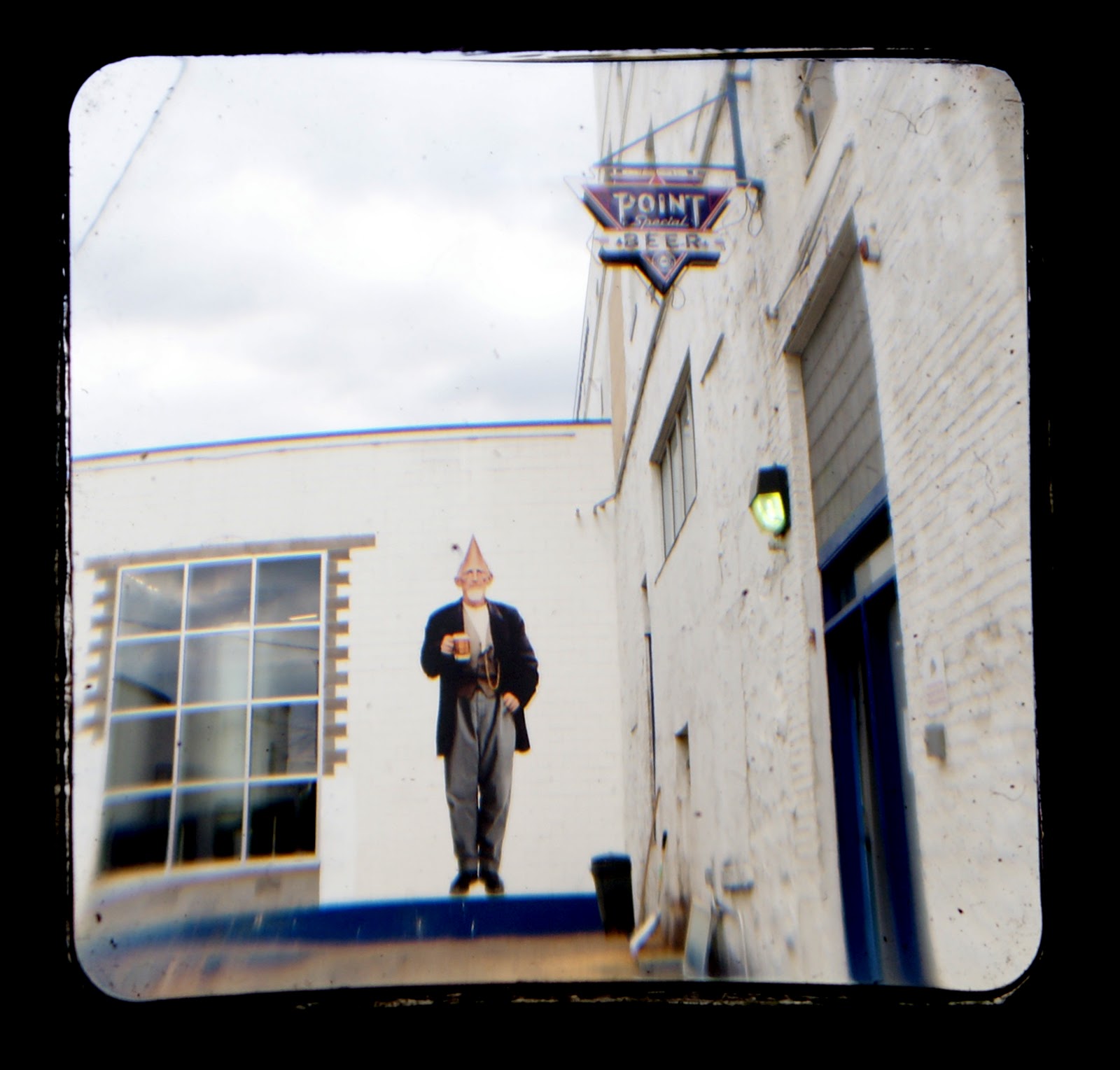
POINTY HEADED

I traveled to Stevens Point to pick up my daughter on Friday.  We stopped at the brewery to get some root beer and cherry soda.   Here are a few TTV pics.


Tuesday, May 1, 2012

About a month ago I posted a picture called Sign of Spring.  One month later Spring is Here.  I did a bit og tweaking on the computer.

Last week Friday and on the weekend, Sheboygan Visual Artists held our 5th annual Membership Show.  I had  three photos in the show and all sold.

Thursday, April 19, 2012

Forgot my tripod

Luckily, the camera is little.


Thursday, March 29, 2012

Through the Viewfinder again

A friend from Sheboygan Visual Artists clued me in on another device to hold the two cameras at the right distance... a cardboard tube.  I tried it out the other day, outdoors in better light than some of my recent attempts, and was pleased with the results.  Here are a few.

Sign of Spring


Dipped In Blue


Sunday, March 25, 2012

More TTV

I thought I'd show my ttv tools. Ttv stands for through the viewfinder.   I was able to purchase a Kodak Duaflex for just $5.00 from Lloyd's in Manitowoc.  I've used it for all of the ttv shots I've made except the figure model in one of my previous posts.  My taking camera is my Sony Alpha 200.  I built a crude contraption to hold it at the right distance from the Duaflex.  This gives me the ability to hold the camera still in low light situations and get a good exposure without the blur of a handheld shot. It also blocks light from hitting the viewfinder causing glare.  It's been fun to play with.


The viewfinder image is flipped horizontally, so there is some editing to do on the computer.  This photo show the lunch I had on March 26th 2012.  I did some blurring of the background and cleaned up the foreground.  As mentioned in the other ttv post, you get the dust and dirt from the old camera.  When I blurred the background to separate the plant on the window sill from my sandwich, I softened the dust too.  It didn't look right with the dirty foreground so I cleaned it up.  The editing program used was Photoshop.